Ajinkya Gaikwad
Frequently Asked Questions
Here are some frequently asked questions. If you have a different question, please check if it was not already answered in the Q&A section of the GitHub Discussions. If not, feel free to ask a new question there.
- Frequently Asked Questions
- After I create a new repository from this template and setup the repo, I get a deployment error. Isn’t the website supposed to correctly deploy automatically?
- I am using a custom domain (e.g., foo.com). My custom domain becomes blank in the repository settings after each deployment. How do I fix that?
- My webpage works locally. But after deploying, it fails to build and throws Unknown tag ‘toc’. How do I fix that?
- My webpage works locally. But after deploying, it is not displayed correctly (CSS and JS are not loaded properly). How do I fix that?
- Atom feed doesn’t work. Why?
- My site doesn’t work when I enable related_blog_posts. Why?
- When trying to deploy, it’s asking for github login credentials, which github disabled password authentication and it exits with an error. How to fix?
- When I manually run the Lighthouse Badger workflow, it fails with Error: Input required and not supplied: token. How do I fix that?
- My code runs fine locally, but when I create a commit and submit it, it fails with prettier code formatter workflow run failed for main branch. How do I fix that?
- After I update my site with some new content, even a small change, the GitHub action throws an error or displays a warning. What happened?
- I am trying to deploy my site, but it fails with Could not find gem ‘jekyll-diagrams’ in locally installed gems. How do I fix that?
- How can I update Academicons version on the template
- How can I update Font Awesome version on the template
- How can I update Tabler Icons version on the template
- What do all these GitHub actions/workflows mean?
- How can I use Google Search Console ID on the template?
After I create a new repository from this template and setup the repo, I get a deployment error. Isn’t the website supposed to correctly deploy automatically?
Yes, if you are using release v0.3.5 or later, the website will automatically and correctly re-deploy right after your first commit. Please make some changes (e.g., change your website info in _config.yml), commit, and push. Make sure to follow deployment instructions. (Relevant issue: 209.)
I am using a custom domain (e.g., foo.com). My custom domain becomes blank in the repository settings after each deployment. How do I fix that?
You need to add CNAME file to the main or source branch of your repository. The file should contain your custom domain name. (Relevant issue: 130.)
My webpage works locally. But after deploying, it fails to build and throws Unknown tag 'toc'. How do I fix that?
Make sure you followed through the deployment instructions in the previous section. You should have set the deployment branch to gh-pages. (Related issue: 1438.)
My webpage works locally. But after deploying, it is not displayed correctly (CSS and JS are not loaded properly). How do I fix that?
If the website does not load the theme, the layout looks weird, and all links are broken, being the main page displayed this way:
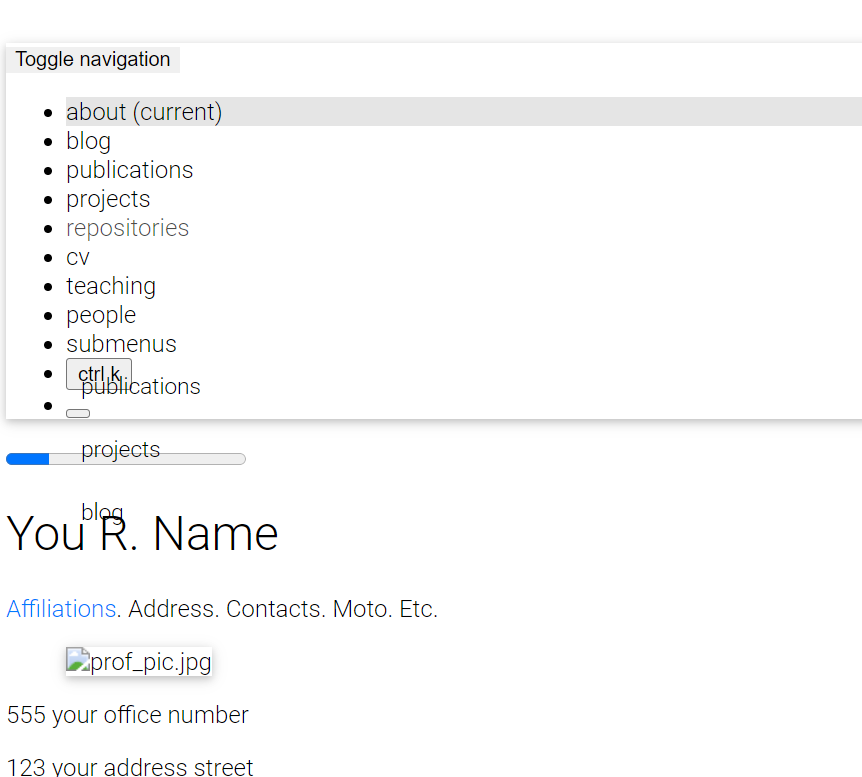
make sure to correctly specify the url and baseurl paths in _config.yml. Set url to https://<your-github-username>.github.io or to https://<your.custom.domain> if you are using a custom domain. If you are deploying a personal or organization website, leave baseurl empty (do NOT delete it). If you are deploying a project page, set baseurl: /<your-project-name>/. If all previous steps were done correctly, all is missing is for your browser to fetch again the site stylesheet. For this, you can:
- press Shift + F5 on Chromium-based or Ctrl + F5 on Firefox-based browsers to reload the page ignoring cached content
- clean your browser history
- simply try it in a private session, here’s how to do it in Chrome and Firefox
Atom feed doesn’t work. Why?
Make sure to correctly specify the url and baseurl paths in _config.yml. RSS Feed plugin works with these correctly set up fields: title, url, description and author. Make sure to fill them in an appropriate way and try again.
My site doesn’t work when I enable related_blog_posts. Why?
This is probably due to the classifier reborn plugin, which is used to calculate related posts. If the error states Liquid Exception: Zero vectors can not be normalized... or sqrt': Numerical argument is out of domain - "sqrt", it means that it could not calculate related posts for a specific post. This is usually caused by empty or minimal blog posts without meaningful words (i.e. only stop words) or even specific characters you used in your posts. Also, the calculus for similar posts are made for every post, which means every page that uses layout: post, including the announcements. To change this behavior, simply add related_posts: false to the front matter of the page you don’t want to display related posts on. Another solution is to disable the lsi (latent semantic indexing) entirely by setting the lsi flag to false in _config.yml. Related issue: #1828.
When trying to deploy, it’s asking for github login credentials, which github disabled password authentication and it exits with an error. How to fix?
Open .git/config file using your preferred editor. Change the https portion of the url variable to ssh. Try deploying again.
When I manually run the Lighthouse Badger workflow, it fails with Error: Input required and not supplied: token. How do I fix that?
You need to create a personal access token and add it as a secret named LIGHTHOUSE_BADGER_TOKEN to your repository. For more information, check lighthouse-badger documentation on how to do this.
My code runs fine locally, but when I create a commit and submit it, it fails with prettier code formatter workflow run failed for main branch. How do I fix that?
We implemented support for Prettier code formatting in #2048. It basically ensures that your code is well formatted. If you want to ensure your code is compliant with Prettier, you have a few options:
- if you are running locally with
Dockerand using development containers,Prettieris already included - if you don’t use
Docker, it is simple to integrate it with your preferred IDE using an extension - if you want to run it manually, you can follow the first 2 steps in this tutorial (
Installing node version manager (nvm)andInstalling Node (latest version)), then, install it usingnpm install prettierinside the project directory, or install it globally on your computer usingnpm install -g prettier. To runPrettieron your current directory usenpx prettier . --write.
You can also disable it for your repo. For this, just delete the file .github/workflows/prettier.yml.
After I update my site with some new content, even a small change, the GitHub action throws an error or displays a warning. What happened?
Probably your GitHub workflow is throwing an error like this:
/opt/hostedtoolcache/Ruby/3.0.2/x64/lib/ruby/gems/3.0.0/gems/bundler-2.5.5/lib/bundler/runtime.rb:304:in `check_for_activated_spec!': You have already activated uri 0.10.1, but your Gemfile requires uri 0.13.0. Since uri is a default gem, you can either remove your dependency on it or try updating to a newer version of bundler that supports uri as a default gem. (Gem::LoadError)
or maybe displaying a warning like one of these:
Node.js 16 actions are deprecated. Please update the following actions to use Node.js 20: actions/checkout@v3. For more information see: https://github.blog/changelog/2023-09-22-github-actions-transitioning-from-node-16-to-node-20/.
Node.js 16 actions are deprecated. Please update the following actions to use Node.js 20: actions/checkout@v2, actions/cache@v2. For more information see: https://github.blog/changelog/2023-09-22-github-actions-transitioning-from-node-16-to-node-20/.
The following actions uses node12 which is deprecated and will be forced to run on node16: actions/checkout@v2, actions/cache@v2. For more info: https://github.blog/changelog/2023-06-13-github-actions-all-actions-will-run-on-node16-instead-of-node12-by-default/
The `set-output` command is deprecated and will be disabled soon. Please upgrade to using Environment Files. For more information see: https://github.blog/changelog/2022-10-11-github-actions-deprecating-save-state-and-set-output-commands/
If that’s the case, you are using deprecated libraries/commands. This happens because you are using a very old version of al-folio. To fix this it is recommended upgrading your code to the latest version of the template. You will probably need to do some manual merging. If you find it easier, you could create a copy of your repository, do a fresh installation from the template and reapply all your changes. For this I would recommend a tool like meld or winmerge to check the differences between directories/files.
Note that libraries tend to be deprecated and support for them dropped as they are no longer maintained, and keep using them involves security breaches. Also, some of these deprecations are enforced, for example, by GitHub itself, so there’s so much we can do. We have also added tons of new functionality, as well as tidying things up and improving the overall speed and structure, so you could also benefit from these improvements.
I am trying to deploy my site, but it fails with Could not find gem 'jekyll-diagrams' in locally installed gems. How do I fix that?
jekyll-diagrams support was dropped in #1992 in favor of using mermaid.js directly. Simply update your code to get the latest changes.
How can I update Academicons version on the template
To update the Academicons version, you need to download the latest release from the Academicons website. After downloading, extract the zip file and copy the files academicons.ttf and academicons.woff from the fonts/ directory to assets/fonts/ and the file academicons.min.css from the css/ directory to assets/css/.
How can I update Font Awesome version on the template
To update the Font Awesome version, you need to download the latest release “for the web” from the Font Awesome website. After downloading, extract the zip file and copy the scss/ directory content to _sass/font-awesome/ and the webfonts/ content to assets/webfonts/.
How can I update Tabler Icons version on the template
To update the Tabler Icons version, you need to download the latest release from the Tabler Icons website. After downloading, extract the zip file and copy the files tabler-icons-filled.scss, tabler-icons-outline.scss, and tabler-icons.scss from the webfont/ directory to _sass/tabler-icons/, and all the files from webfont/fonts/ to assets/fonts/.
What do all these GitHub actions/workflows mean?
GitHub actions are a way to automate tasks in the repository. They are defined in .github/workflows/ directory. Each file in this directory is a workflow. Workflows are made up of one or more jobs, and each job runs on a virtual machine hosted by GitHub. You can see the status of the workflows in the Actions tab of your repository. For more information, check the GitHub Actions documentation.
Currently we have the following workflows:
axe.yml: does some accessibility testing in your site. It uses the axe cli tool with a chrome driver to render the webpage and allow the analysis. Must be run manually, since fixing some of the issues is not straightforwardbroken-links-site.yml: checks for broken links in your built website with the lychee-actionbroken-links.yml: checks for broken links in your repository with the lychee-actiondeploy-docker-tag.yml: adds some metadata to the docker image and pushes it to Docker Hubdeploy-image.yml: deploys a new docker image with the latest changes to Docker Hubdeploy.yml: deploys the website to GitHub Pagesdocker-slim.yml: deploys a smaller version of the docker image to Docker Hub with the docker-slim-actionlighthouse-badger.yml: runs a lighthouse test for your site with the lighthouse-badger-action, saving the results in the repository for easy inspecting, as can be seen here. For more information on how to enable this workflow, check our FAQ question about itprettier-comment-on-pr.yml: not working. For now, this action is disabled. It was supposed to run prettier on the PRs and comment on them with the changes needed. For more information, check issue 2115prettier.yml: runs prettier on the code to ensure it is well formatted. For more information, check our FAQ question about it
How can I use Google Search Console ID on the template?
In the configuration file _config.yml the tag google-site-verification should be updated to use this functionality. Here is how you can proceed,
- Generate your HTML tag by following https://support.google.com/webmasters/answer/9008080?hl=en#meta_tag_verification&zippy=%2Chtml-tag with URL prefix option.
- In the verify ownership option choose HTML tag and copy the tag contents which should look like
<meta name="google-site-verification" content="GoogleSearchConsoleID" />. - The string against
contentis the Google Search Console ID that can be used in the template. e.g.google-site-verification: GoogleSearchConsoleID. Now set the propertyenable_google_verification: true.
It looks like the Domain type property in the Google Search Console to verify the ownership of all URLs across all subdomains with GitHub Pages does not work.